This module provides a USB Host Mass Storage Class (HMSC) driver. It implements the USB HMSC Interface.
Overview
The r_usb_hmsc module, when used in combination with the r_usb_basic module, operates as a USB Host Mass Storage Class (HMSC) driver. It is built on the USB Mass Storage Class Bulk-Only Transport (BOT) protocol. It is possible to communicate with BOT-compatible USB storage devices by combining this module with a file system and storage device driver.
- Note
- This module should be used in combination with the FreeRTOS+FAT File System.
Features
The r_usb_hmsc module has the following key features:
- Checking of connected USB storage devices to determine whether or not operation is supported
- Storage command communication using the BOT protocol
- Support for SFF-8070i (ATAPI) USB mass storage subclass
- Sharing of a single pipe for IN/OUT directions or multiple devices
- Supports up to 4 connected USB storage devices
Class Requests
The class requests supported by this driver are shown below.
| Request | Description |
| GetMaxLun | Gets the maximum number of units that are supported. |
| MassStorageReset | Cancels a protocol error. |
Storage Commands
This driver supports the following storage commands:
- TEST_UNIT_READY
- MODE_SELECT10
- MODE_SENSE10
- PREVENT_ALLOW
- READ_FORMAT_CAPACITY
- READ10
- WRITE10
Configuration
Refer to the USB (r_usb_basic) module.
Clock Configuration
Refer to the USB (r_usb_basic) module.
Pin Configuration
Refer to the USB (r_usb_basic) module.
Usage Notes
- Warning
- Due to the wide variety of USB mass storage device implementations, this driver is not guaranteed to work with all devices. When implementing the driver it is important to verify correct operation with the mass storage devices that the end user is expected to use.
Multi Port
This driver supports simultaneous operation with Peripheral Communication Device Class(PCDC). If the user are using MCU that supports 2 USB modules, such as RX74M, the user can run HMSC on one USB module and PCDC on the other. This driver does not support simultaneous operation using device classes other than PCDC.
For Bare Metal
- To use FreeRTOS+FAT without FreeRTOS, copy FreeRTOSConfigMinimal.h to one of your project's include paths and rename it FreeRTOSConfig.h.
- In RX configurator, enter the appropriate values in the Main stack size and Heap size fields. The figure below is an example of the EK-RX74M board.
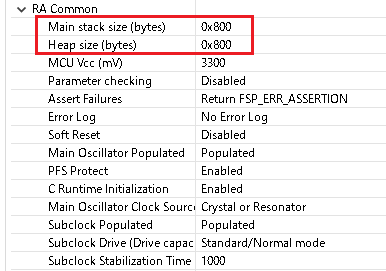
BSP Setting
- In the Bare Metal version, specify "NULL" in the Callback item.
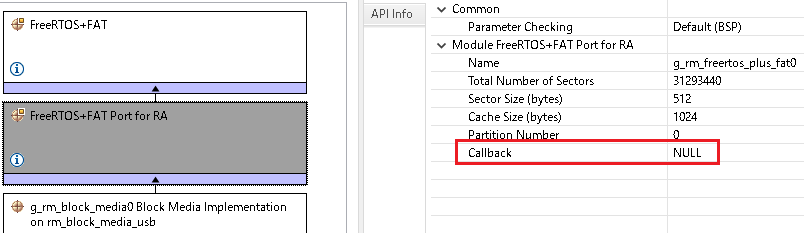
For Bare Metal Setting
Limitations
- Some MSC devices may be unable to connect because they are not recognized as storage devices.
- MSC devices that return values of 1 or higher in response to the GetMaxLun command (mass storage class command) are not supported.
- A maximum of 4 USB storage devices can be connected.
- Only USB storage devices with a sector size of 512 bytes can be connected.
- A device that does not respond to the READ_CAPACITY command operates as a device with a sector size of 512 bytes.
- The continuous transfer mode cannot be used when using DMA.
- This module must be incorporated into a project using r_usb_basic and does not provide any public APIs.
- This driver does not support Low-speed.
- The current USB driver does not support FreeRTOS.
Examples
USB HMSC Example
Example Operating Environment
The following shows an example operating environment for the HMSC.
Refer to the associated instruction manuals for details on setting up the evaluation board and using the emulator, etc.
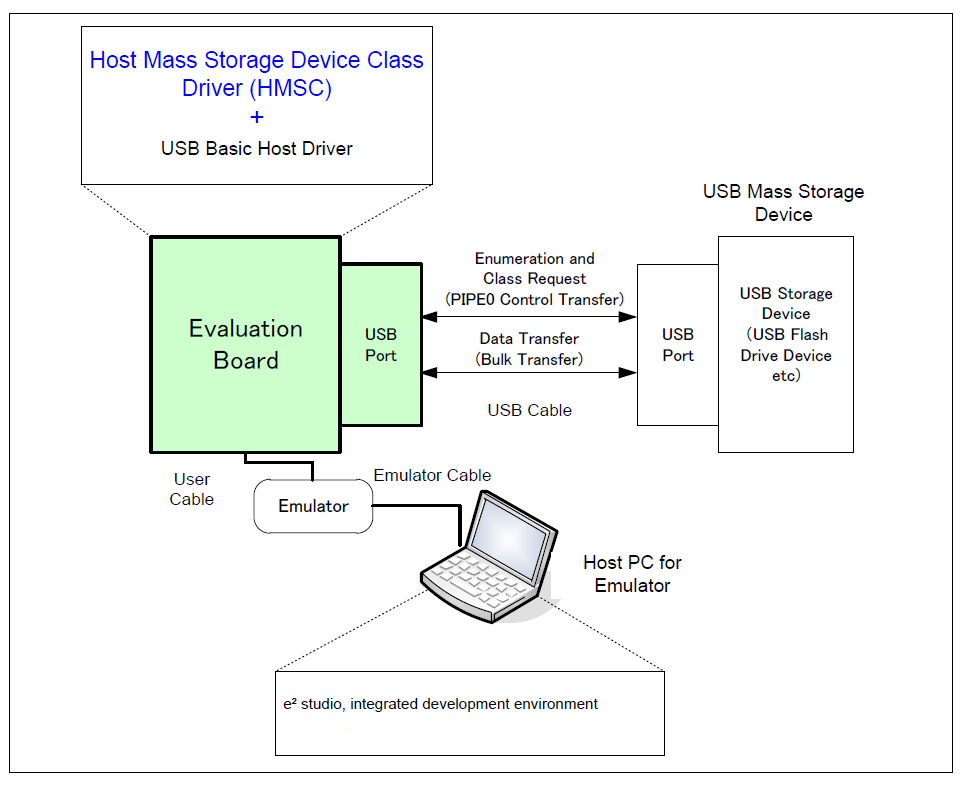
Example Operating Environment
Application Specifications
The main functions of the application are as follows:
- Performs enumeration and drive recognition processing on MSC devices.
- After the above processsing finisihes, the application writes the file to the MSC device once.
- After writing the above file, the APL repeatedly reads the file. It continues to read the file repeatedly until the switch is pressed again.
Application Processing (for RTOS)
This application has two tasks. An overview of the processing in these two tasks is provided below.
usb_apl_task
- After start up, MCU pin setting, USB controller initialization, and application program initialization are performed.
- The MSC device is attached to the kit. When enumeration and drive recognition processing have completed, the USB driver calls the callback function (usb_apl_callback). In the callback function (usb_apl_callback), the application task is notified of the USB completion event using the FreeRTOS functionality.
- In the application task, information regarding the USB completion event about which notification was received from the callback function is retrieved using the real-time OS functionality.
- If the USB completion event (the event member of the usb_ctrl_t structure) retrieved in step 2 above is USB_STS_CONFIGURED then, based on the USB completion event, the MSC device is mounted and the file is written to the MSC device.
- If the USB completion event (the event member of the usb_ctrl_t structure) retrieved in step 2 above is USB_STS_DETACH, the application initializes the variables for state management.
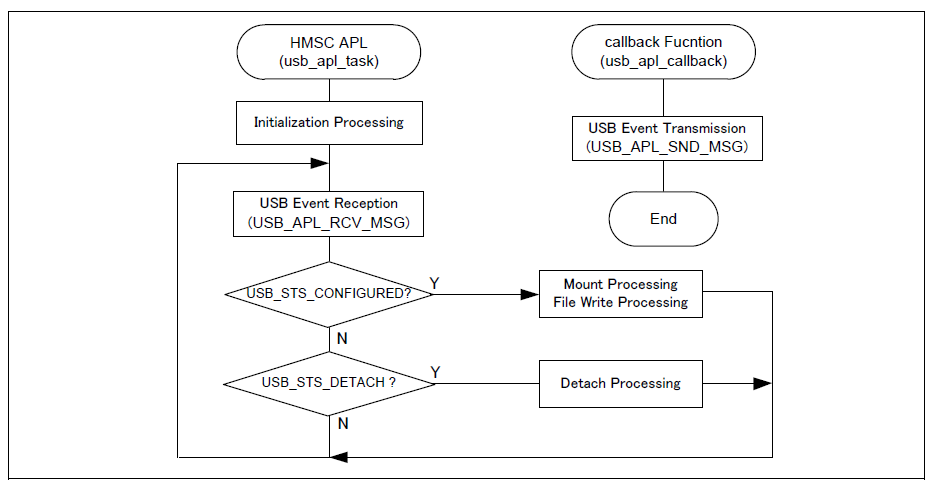
usb_apl_task
file_read_task
Of the application tasks usb_apl_task and file_read_task, file_read_task is processed while usb_apl_task is in the wait state. This task performs file read processing on the file that was written to the MSC device.
Example Code
#if 0 // Not File system
#define RM_FREERTOS_PLUS_FAT_EXAMPLE_FILE_NAME "TEST_FILE.txt"
#define RM_FREERTOS_PLUS_FAT_EXAMPLE_BUFFER_SIZE_BYTES (10240)
#define RM_FREERTOS_PLUS_FAT_EXAMPLE_PARTITION_NUMBER (0)
#define RM_FREERTOS_PLUS_FAT_EXAMPLE_SUPPORT_USB
typedef enum
{
STATE_ATTACH, STATE_DATA_READY, STATE_DATA_WRITE, STATE_FILE_READ, STATE_DETACH, STATE_ERROR,
} state_t;
uint8_t g_file_data[RM_FREERTOS_PLUS_FAT_EXAMPLE_BUFFER_SIZE_BYTES];
uint8_t g_read_buffer[RM_FREERTOS_PLUS_FAT_EXAMPLE_BUFFER_SIZE_BYTES];
static uint16_t g_state = STATE_DETACH;
void usb_hmsc_baremetal_example (void)
{
uint16_t i;
uint16_t k;
FF_FILE * pxSourceFile;
FF_Disk_t disk;
usb_event_info_t event_info;
FF_Error_t ff_err;
size_t size_return;
int close_err;
for (i = 0; i < RM_FREERTOS_PLUS_FAT_EXAMPLE_BUFFER_SIZE_BYTES; i++)
{
g_file_data[i] = (uint8_t) i;
}
#ifdef RM_FREERTOS_PLUS_FAT_EXAMPLE_SUPPORT_USB
while (1)
{
g_usb_on_usb.
eventGet(&event_info, &event);
switch (event)
{
{
p_instance_ctrl = event_info.p_context;
p_instance_ctrl->device_address = event_info.device_address;
FF_Mount(&disk, RM_FREERTOS_PLUS_FAT_EXAMPLE_PARTITION_NUMBER);
FF_FS_Add("/", &disk);
pxSourceFile = ff_fopen((const char *) RM_FREERTOS_PLUS_FAT_EXAMPLE_FILE_NAME, "w");
ff_fwrite(g_file_data, sizeof(g_file_data), 1, pxSourceFile);
ff_fclose(pxSourceFile);
g_state = STATE_FILE_READ;
break;
}
{
g_state = STATE_DETACH;
break;
}
default:
{
break;
}
}
if (STATE_FILE_READ == g_state)
{
pxSourceFile = ff_fopen((const char *) RM_FREERTOS_PLUS_FAT_EXAMPLE_FILE_NAME, "r");
for (k = 0; k < RM_FREERTOS_PLUS_FAT_EXAMPLE_BUFFER_SIZE_BYTES; k++)
{
g_read_buffer[k] = (uint8_t) 0;
}
size_return = ff_fread(g_read_buffer, sizeof(g_file_data), 1, pxSourceFile);
close_err = ff_fclose(pxSourceFile);
}
}
#endif
}
#endif // Not File system
